
Let's get you logged in
Follow the instructions here, and you should be able to get logged in to the app in about 5 minutes:
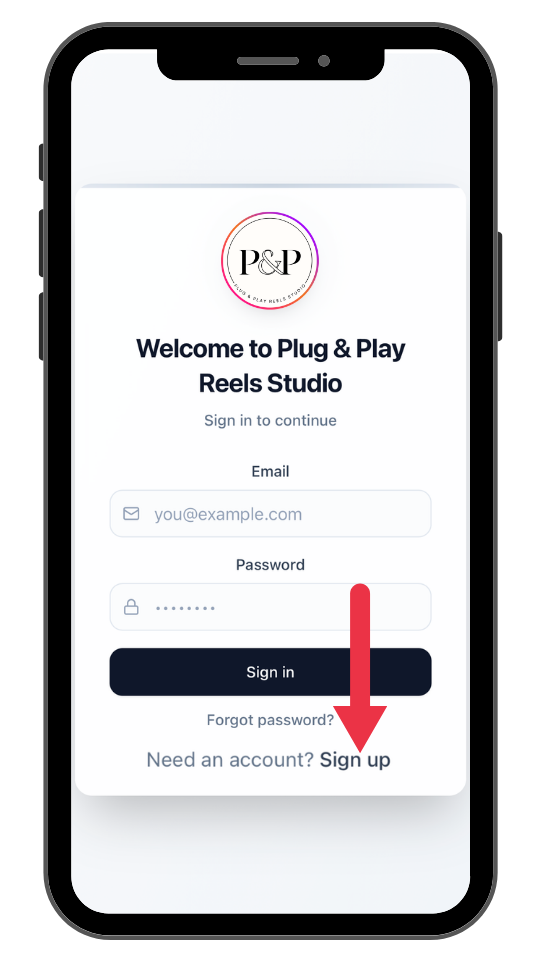
- First SIGN UP for the app and create you account
(do not sign in)
- Can’t log in?
*Before you can log in, first you must to SIGN UP and create your app account:
The number one reason people aren't able to access the app is because they actually haven't signed up for the app first. (They're trying to login before they’ve signed up).
You’ll need to sign up using the same email address you used to purchase your app subscription (or Academy subscription). Once you’ve signed up, you'll get a verification code to the email you used to sign up. Then just enter the verification code and you'll be able to access the app. Then you'll be able to log in to use the app. - Not getting the verification code?
First check all spam and promotional folders in your email inbox. Then try to sign up again.
It may take a few minutes to get the verification code.
Second, if you still haven’t received a verification code to your email, this likely means that you may have made a typo in your email when you tried to sign up for the app (eg. “@gnail” or “.con”.
Go through the sign-up process again and make sure you're typing in the correct email address without errors.
- Still not able to sign up, login or get the verification code?
This means you may have signed up with the app with a different email address than the email you used to purchase your subscription:
Make sure you sign up with the same email address that you used to make your app purchase with.
- Seeing the access blocked page?
If you're seeing the Access Block page, this means that you signed up successfully to the app but that you don’t currently have a subscription associated with that email.
Usually, this means that the email you used to sign up is not the same email you used to purchase your subscription. You'll need to sign up with the same email you used to purchase your app subscription.
Or You don’t currently have a subscription to the App. - If you've done all of the following steps and still can't gain access to the app, this is likely because your email that you purchased with had a type error in it.
No worries. Our team will need to look into it further to get you logged in!
Just send us an email to [email protected] with your full name and correct email address that you purchased with and our team will get back to you during weekday office hours as soon as we're able.
- Caroline & Steve
The Plug & Play reels Studio App founders